Fujifilm’s instax mini Evo 2 Asks a Better Question: Which Photos Will You Print?
Source FujiFilm
There is a difference between a photograph you keep and a photograph you put on the fridge.
The first might survive because you never got around to deleting it. The second has earned a place in your daily life. Someone will see it while making coffee, reaching for milk or looking for a shopping list. It becomes part of the room rather than another file waiting behind a screen. That is the interesting promise of Fujifilm’s new instax mini Evo 2. Not simply another way to take photographs, but a reason to decide what happens to them afterwards.
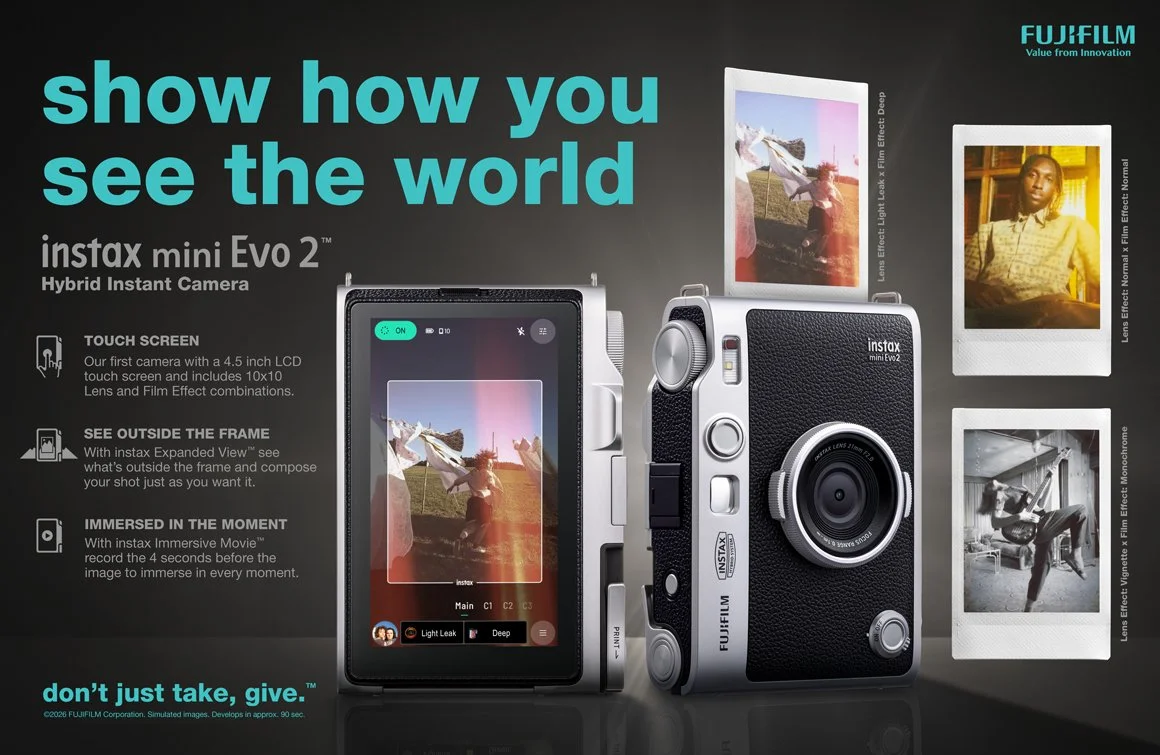
Fujifilm announced the camera on 27 October 2026, with its headquarters release listing availability from 27 November onwards. It combines digital capture with selective instant printing and can also print photographs from a smartphone. That hybrid approach lets you make several photographs before deciding which deserve film. Local availability should be checked separately. Fujifilm’s official announcement. fujifilm.com I haven’t tested the mini Evo 2, so this isn’t a verdict on its image quality, handling or value. What interests me is the photographic habit it encourages, and the tension it creates between enjoying a moment and endlessly reviewing it. I do own the original mini Evo and love that.
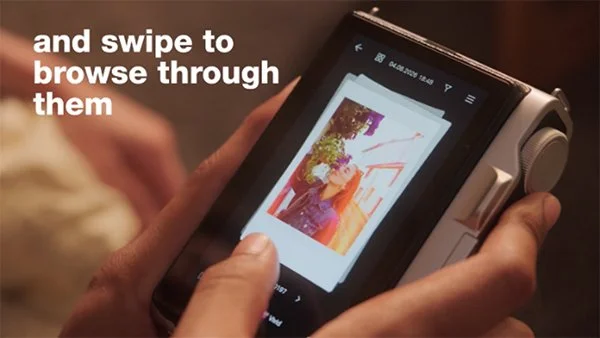
Traditional instant photography makes the decision at the shutter. Press the button and you have committed a piece of film, whether the expression is wonderful, the framing is awkward or your finger has wandered into the picture. That can be frustrating. It can also be liberating. The photograph exists, and there is no longer much point arguing with it. A hybrid camera moves that commitment further along. You can experiment without consuming film every time, then choose what becomes physical. For beginners, that makes room to learn. Try a closer composition. Change your position. Wait for a different expression. Compare the results before printing.
Source Fujifilm
But the same freedom can become another excuse to postpone choosing.
If you have ever taken several almost identical photographs and then struggled to select one, you already know the problem. The camera has made capturing easy. It has not made deciding easy. The mini Evo 2 adds a 4.5-inch touchscreen, while its maximum 13-megapixel capture requires a microSD card and Expanded View mode switched off. Fujifilm also lists combinations of ten lens effects and ten film effects. Those are confirmed features, not evidence of how well the camera performs in practice. fujifilm.com A larger preview may help you spot a distracting background or an awkward crop. Effects offer ways to explore colour and contrast. Neither can tell you whether the photograph matters.
That decision is yours. For me, the useful question is not “Which frame is technically best?” It is “What am I trying to preserve?” Suppose you photograph a friend across a café table. One frame has beautifully tidy composition, but their expression feels guarded. Another catches a genuine laugh, with a glass entering the bottom corner. A third has pleasing light but says very little about the person. If the photograph is meant to remember your friendship, the laugh may be the right choice. If you are practising composition, the tidier frame may deserve closer attention. There is no universal winner because the purpose changes the answer.
Beginners are often encouraged to identify faults before they learn to recognise strengths. We notice the clipped elbow, bright background or slightly soft detail, then dismiss the whole photograph. Those things can matter. They just don’t always matter most. Printing is a useful way to challenge that habit. At a modest physical size, you experience the whole image without continually enlarging tiny sections. Expression, gesture, shape and the relationship between subjects have a chance to lead. This does not mean that small prints magically rescue poor photographs. Missed focus can still be distracting. A subject lost against a busy background remains difficult to read. But examining a picture at its intended viewing size is usually more meaningful than judging every file as though it were destined for a billboard.
If you are choosing an image for a small print, pay particular attention to how clearly the subject reads. A person occupying a tiny part of a complicated scene may become difficult to recognise. Moving closer can help, but so can finding a quieter background or waiting for the subject to separate from surrounding shapes. Before worrying about an effect, look at what the viewer will notice first. Then look around the edges. Is something pulling attention away? Does the crop cut through an important gesture? Would including a little more space help explain the moment? These are useful questions with any camera. A print simply gives you a reason to answer them. The danger comes when selection turns into an audition for perfection. You could spend an entire afternoon making photographs, adjusting their appearance and deciding that none is quite worthy of a sheet of film. That would reproduce the same problem many of us already have with our phones: plenty captured, very little enjoyed.
My suggestion is to give the decision a boundary. After an ordinary outing, choose one photograph to print. It does not need to summarise the entire day or impress someone who wasn’t there. It needs to give you one reason to keep looking. Perhaps it records something funny. Perhaps the colours work beautifully together. Perhaps it shows someone you love during an otherwise unremarkable afternoon. Make the choice while you can still remember why you pressed the shutter. You can change your mind about your favourite later. Printing one image is not a declaration that every other photograph has failed.
There is also a fair argument against this whole approach. Some photographers enjoy instant cameras precisely because they remove the preview-and-perfect routine. They want the surprise, the accidental frame and the slightly uncomfortable commitment. A hybrid model cannot provide quite the same experience when reviewing and choosing are central to its appeal. Whether that is an improvement depends on what you want photography to feel like. I wouldn’t call either approach more authentic. One encourages commitment before seeing the result; the other encourages selection afterwards. Both can produce meaningful photographs, and both can become habits you follow without thinking. Nor do you necessarily need a new camera to explore this.
If your phone already makes photographs you enjoy, start by printing some of those. A separate printer or a straightforward print order may address the actual problem: your pictures never leaving the screen. The appeal of an integrated camera is having capture and printing together, not gaining exclusive access to meaningful photographs. The buying decision should include the ongoing cost of film, not just the camera. Think about how often you genuinely expect to print. An occasional keepsake and a camera passed around at gatherings are different uses, with different running costs.
If you want help making photographs that communicate clearly before you reach the printing stage, my private photography lessons in Brisbane cover the light, composition and camera choices that make a practical difference.
The mini Evo 2 gives us a timely reason to think about the final step of photography. We spend plenty of energy discussing how photographs are captured and edited. Choosing where they will live deserves some attention too. A photograph does not need to be printed to matter. Digital images can be deeply valuable, and not every memory needs a physical copy. But a print asks for a particular kind of attention. You have selected it, given it space and made it available without opening an app. Would being able to choose encourage you to print more, or would you miss the commitment of an instant camera that prints every frame?
That is a more interesting question than how many photographs the camera can hold.