Free Photoshop and Lightroom Alternatives Built With AI: What Are You Actually Getting?
There is something very tempting about the words “Photoshop alternative” followed by “free”.
Especially when you have returned from a weekend with a memory card full of photographs, opened your editing software and remembered that another subscription payment is coming out. You might only want to straighten a horizon, improve a portrait and rescue a slightly dark photograph. Paying indefinitely for that privilege can start to feel disproportionate.
Now PhotoCraft and LightCraft are attracting attention with a proposition that goes considerably further: familiar creative tools, developed with AI assistance, offered as free, open-source applications.
Coverage on 13 October 2026 presented the project as a challenge to Adobe’s established software. You can understand why that story travels quickly. People want more choice, and photographers have plenty of other things competing for their money. digitalcameraworld.com
But before cancelling anything, I would ask a less exciting question. Can these applications reliably finish your photographs? That is the question worth exploring here. I have researched the developers’ documentation rather than conducted a hands-on comparison, so this is a guide to understanding the proposition and assessing it sensibly.
PhotoCraft and LightCraft belong to the ArtCraft team’s Crafting Apps collection. PhotoCraft tackles image editing, while LightCraft handles a photo library and RAW development. The official directory currently describes PhotoCraft as early alpha and LightCraft as in development. These are working projects with installers, but those labels matter. ArtCraft For a photographer, the distinction between the two applications is straightforward. A library and RAW developer helps you sort a shoot and interpret the information your camera recorded. A layered image editor gives you another kind of control: combining elements, making selective changes and building a document from separate pieces. You might need both. You might only need one.
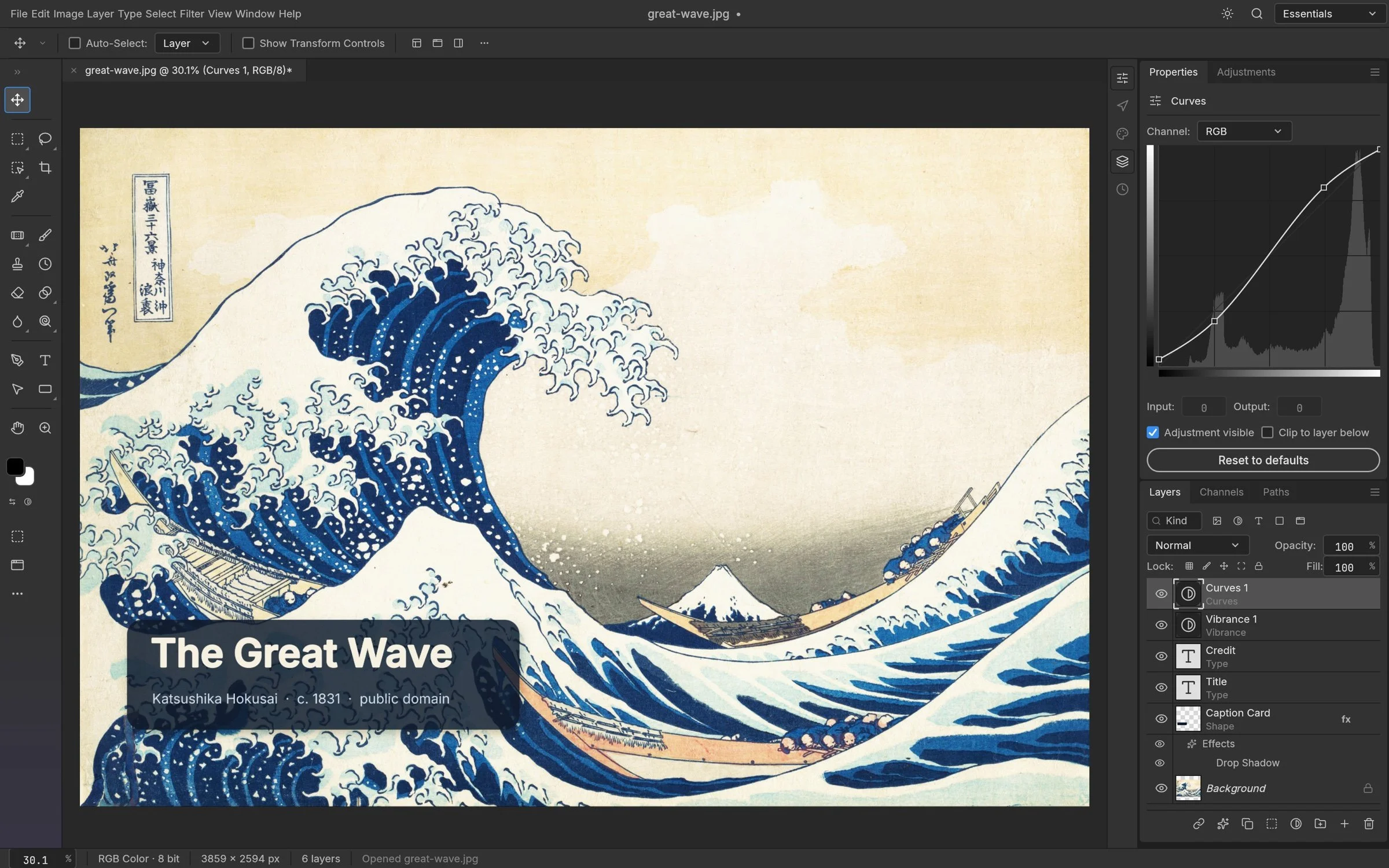
PhotoCraft’s developer-supplied demonstration shows its layered editing interface. Screenshot: ArtCraft; artwork: Katsushika Hokusai, The Great Wave off Kanagawa. Official press-kit source and full-resolution download.
The interesting part is how quickly an unfamiliar application can become approachable when its layout makes sense. Recognisable panels and familiar editing concepts can lower the barrier to trying something new.
However, recognising a Curves panel tells us very little about whether a complicated document will survive being saved, closed and reopened.
The PhotoCraft documentation makes a refreshingly useful distinction: having commands connected to menu items does not establish that their behaviour matches Photoshop. It also identifies gaps in areas including plug-in compatibility and professional workflows. That is a more meaningful starting point than treating every visible button as a completed feature. storytold/photocraft at explainx · GitHub
I would apply the same caution to the word “AI”. Using AI to help write an editing application does not mean the application can perform every AI editing trick you have seen elsewhere. Software development and photographic editing are different jobs. A tool can be built with substantial AI assistance and still require you to make ordinary, deliberate decisions about exposure, colour and composition.
For beginners, that is hardly a disadvantage. Learning why a photograph needs an adjustment is more useful than collecting buttons that promise to improve it automatically.
LightCraft’s published feature information describes familiar adjustments, masking, presets and exports, alongside RAW development. It also distinguishes conventional noise reduction from AI Denoise and Super Resolution, which that documentation lists as unavailable. Its RAW support has qualifications rather than a universal promise. Because development is moving quickly, check the release you actually download. GitHub
RAW compatibility deserves particular attention.
A camera manufacturer’s name on a supported-format list is not enough. Different cameras, compression settings and file variants can present different problems. Even seeing your photograph appear on screen does not necessarily establish that the application has decoded all its RAW information; cameras commonly embed a ready-made preview inside the file. This is why I would begin with a small folder of copied photographs from my own camera. Choose pictures that expose weaknesses. Include a face, a bright sky, a dark interior and something with fine detail. A pleasantly lit landscape is useful, but a difficult photograph will usually tell you more.
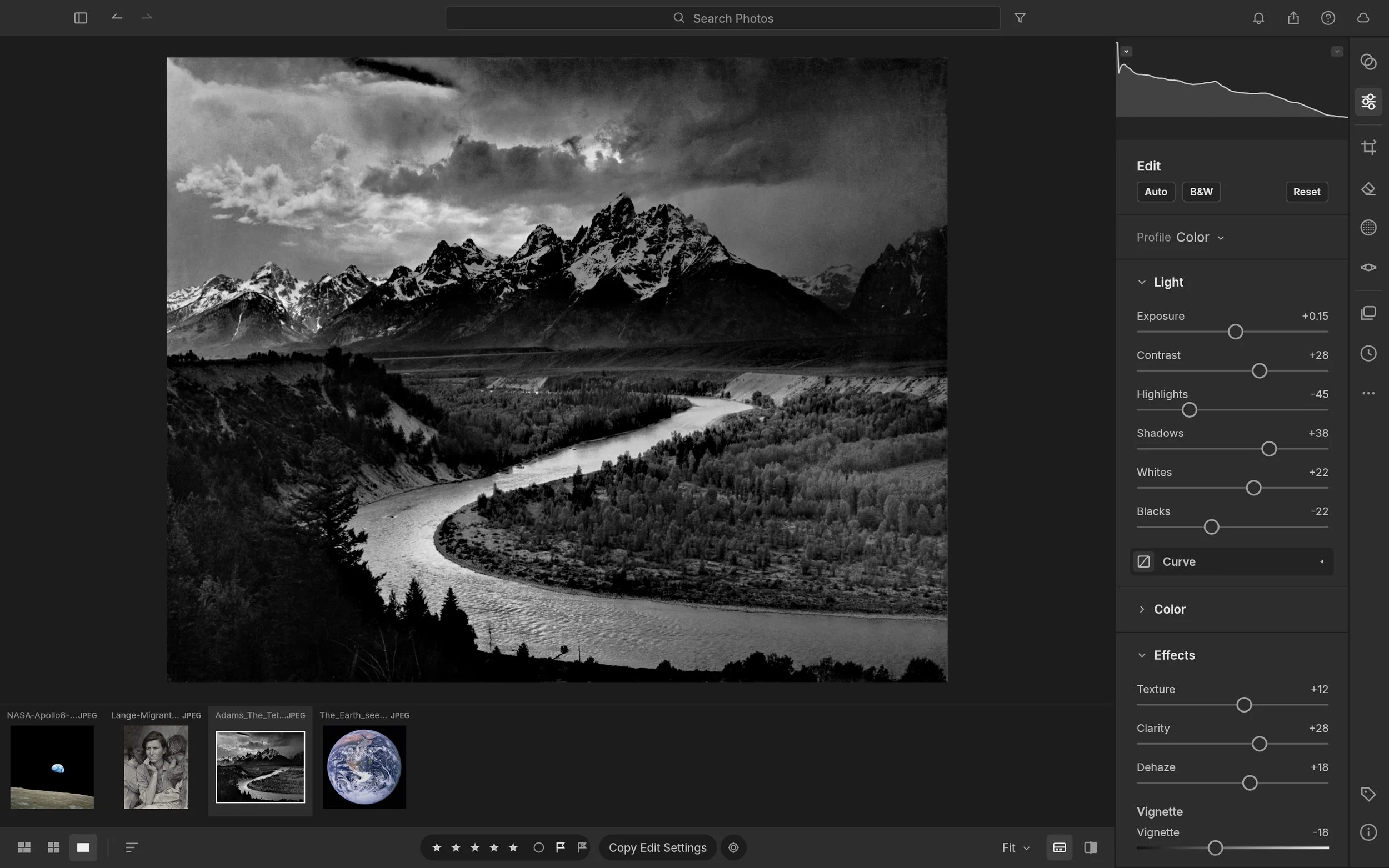
LightCraft’s developer-supplied demonstration shows its photographic editing workspace. Screenshot: ArtCraft; photograph: Ansel Adams, The Tetons and the Snake River (1942), U.S. National Archives. Official press-kit source and full-resolution download.
Start with exposure and white balance. Can you move a dark photograph towards a useful result without strange colour shifts? Do skin tones remain believable? Can you reduce a bright area without turning the surrounding picture dull? Do not expect identical slider values to produce identical results in different programs. Exposure controls may be reasonably comparable, but contrast, highlight recovery and colour treatments can behave differently. Judge whether you can reach a convincing photograph, rather than whether two sets of numbers match. And remember that a different default rendering is not automatically an incorrect one. RAW files need interpretation. The useful question is whether you have sufficient control to reach the result you want.
Next, try a local adjustment. Brighten a face slightly. Darken a distracting corner. Make a gentle change to the sky. Look closely at the boundary of the adjustment, particularly around hair, branches and buildings. Then zoom back out and judge the whole photograph. A mask that looks impressive as a coloured overlay still needs to produce a natural transition in the finished picture. Saving is the next test, and it is easy to overlook because it is so ordinary.
Close the application. Reopen the image or project. Check that your changes remain, that layers and masks are still editable where expected, and that the photograph looks the same. If you depend on another program, try opening the exported file there too. An application earns trust through these uneventful moments.
Finally, export something you would actually share. Open it outside the editor and examine the colour, dimensions and detail. If it is destined for your website, inspect it at the size readers will see. A photograph that looks good inside one application has only completed part of its journey. This modest exercise tells you more about personal suitability than a headline announcing that an entire software industry has been replaced. It also helps clarify what “free” means to you.
There may be no purchase price, but learning, troubleshooting and repeating work still take time. For someone who enjoys experimenting, that time can be enjoyable. For someone with twenty minutes to edit family photographs before bed, it can become the deciding cost. Equally, an application does not need to reproduce everything in Photoshop to be useful. If your needs are straightforward and the tools you rely on work well, a smaller feature set may be perfectly adequate. I would rather judge software against a photographer’s actual work than against an imaginary requirement to use every professional feature.
There is another encouraging possibility here. More credible choices could give established developers stronger reasons to improve value, simplify workflows and listen to ordinary photographers. That is an outcome worth hoping for, even if you never install either application. For now, my view is that PhotoCraft and LightCraft deserve curiosity accompanied by practical testing. Their early status is a reason to set sensible expectations and work with copies while you explore.
If you want help understanding what your photographs need before reaching for another adjustment, my private photography lessons in Brisbane cover the observation, exposure and composition decisions that make editing more purposeful.
The most useful question is not whether AI can build something that resembles your editor. It is whether that editor helps you finish photographs you are pleased to share. Would you accept a few rough edges to leave a subscription behind, or is dependable familiarity worth the ongoing cost? I suspect the answer depends less on brand loyalty than on how you spend your evenings.